
ReadMe.md (3473B)
1 # colors.js [](https://travis-ci.org/Marak/colors.js) 2 3 ## get color and style in your node.js console 4 5 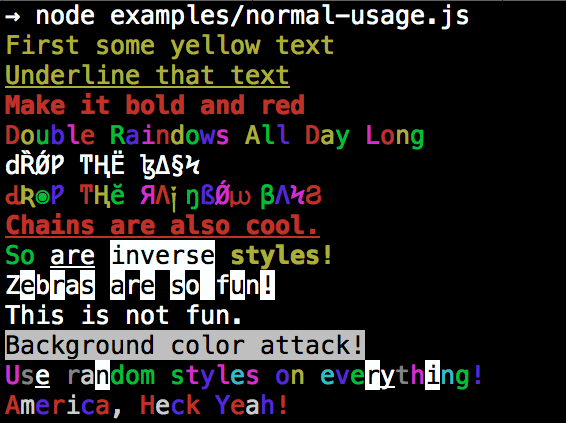 6 7 ## Installation 8 9 npm install colors 10 11 ## colors and styles! 12 13 ### text colors 14 15 - black 16 - red 17 - green 18 - yellow 19 - blue 20 - magenta 21 - cyan 22 - white 23 - gray 24 - grey 25 26 ### background colors 27 28 - bgBlack 29 - bgRed 30 - bgGreen 31 - bgYellow 32 - bgBlue 33 - bgMagenta 34 - bgCyan 35 - bgWhite 36 37 ### styles 38 39 - reset 40 - bold 41 - dim 42 - italic 43 - underline 44 - inverse 45 - hidden 46 - strikethrough 47 48 ### extras 49 50 - rainbow 51 - zebra 52 - america 53 - trap 54 - random 55 56 57 ## Usage 58 59 By popular demand, `colors` now ships with two types of usages! 60 61 The super nifty way 62 63 ```js 64 var colors = require('colors'); 65 66 console.log('hello'.green); // outputs green text 67 console.log('i like cake and pies'.underline.red) // outputs red underlined text 68 console.log('inverse the color'.inverse); // inverses the color 69 console.log('OMG Rainbows!'.rainbow); // rainbow 70 console.log('Run the trap'.trap); // Drops the bass 71 72 ``` 73 74 or a slightly less nifty way which doesn't extend `String.prototype` 75 76 ```js 77 var colors = require('colors/safe'); 78 79 console.log(colors.green('hello')); // outputs green text 80 console.log(colors.red.underline('i like cake and pies')) // outputs red underlined text 81 console.log(colors.inverse('inverse the color')); // inverses the color 82 console.log(colors.rainbow('OMG Rainbows!')); // rainbow 83 console.log(colors.trap('Run the trap')); // Drops the bass 84 85 ``` 86 87 I prefer the first way. Some people seem to be afraid of extending `String.prototype` and prefer the second way. 88 89 If you are writing good code you will never have an issue with the first approach. If you really don't want to touch `String.prototype`, the second usage will not touch `String` native object. 90 91 ## Disabling Colors 92 93 To disable colors you can pass the following arguments in the command line to your application: 94 95 ```bash 96 node myapp.js --no-color 97 ``` 98 99 ## Console.log [string substitution](http://nodejs.org/docs/latest/api/console.html#console_console_log_data) 100 101 ```js 102 var name = 'Marak'; 103 console.log(colors.green('Hello %s'), name); 104 // outputs -> 'Hello Marak' 105 ``` 106 107 ## Custom themes 108 109 ### Using standard API 110 111 ```js 112 113 var colors = require('colors'); 114 115 colors.setTheme({ 116 silly: 'rainbow', 117 input: 'grey', 118 verbose: 'cyan', 119 prompt: 'grey', 120 info: 'green', 121 data: 'grey', 122 help: 'cyan', 123 warn: 'yellow', 124 debug: 'blue', 125 error: 'red' 126 }); 127 128 // outputs red text 129 console.log("this is an error".error); 130 131 // outputs yellow text 132 console.log("this is a warning".warn); 133 ``` 134 135 ### Using string safe API 136 137 ```js 138 var colors = require('colors/safe'); 139 140 // set single property 141 var error = colors.red; 142 error('this is red'); 143 144 // set theme 145 colors.setTheme({ 146 silly: 'rainbow', 147 input: 'grey', 148 verbose: 'cyan', 149 prompt: 'grey', 150 info: 'green', 151 data: 'grey', 152 help: 'cyan', 153 warn: 'yellow', 154 debug: 'blue', 155 error: 'red' 156 }); 157 158 // outputs red text 159 console.log(colors.error("this is an error")); 160 161 // outputs yellow text 162 console.log(colors.warn("this is a warning")); 163 164 ``` 165 166 You can also combine them: 167 168 ```javascript 169 var colors = require('colors'); 170 171 colors.setTheme({ 172 custom: ['red', 'underline'] 173 }); 174 175 console.log('test'.custom); 176 ``` 177 178 *Protip: There is a secret undocumented style in `colors`. If you find the style you can summon him.*